Highlights
Special Compliance Release Highlight
New features
New Company Setting to Display Insurance, Unsubmitted, and Do Not Bill Aging Balances in Patient Summary
U13942: A new company setting within Setup > Administrative Setup > Company Settings has been created to include Patient Balance, Insurance Balance, Unsubmitted Balance, and Do Not Bill Balance within the patient setup's "Summary" tab. When set, Company Setting: Display Insurance, Unsubmitted and Do Not Bill aging balances in Patient Summary will include the the extra balances within the Patient Setup > Summary screen. 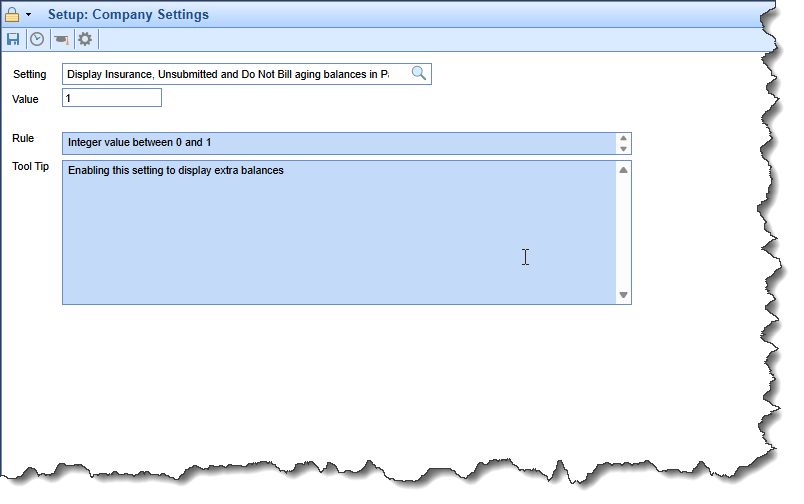
New Procedure Code Validation to Only Be Billed Once Per Year (365 days)
U20438: Certain screenings and procedures can only be billed once per year to date, not per calendar year. In this release, we added a new procedure code flag to allow codes to be billed only once per 365 days. The new option can be found within Setup > Procedure Codes > Billing tab. When the "Only allow this code to be used once per year (365 days)" checkbox is selected, it will trigger a claim validation to check if the patient has had that code billed year-to-date from the date of service. If so, the claim will fail validation and not be billable. This validation will occur on the Superbill at the time of saving and on the claim entry screen.
As part of this release, we also updated the name of the existing "Only allow this code to be used once per year" checkbox to "Only allow this code to be used once per calendar year" to differentiate it from the 365-day option. 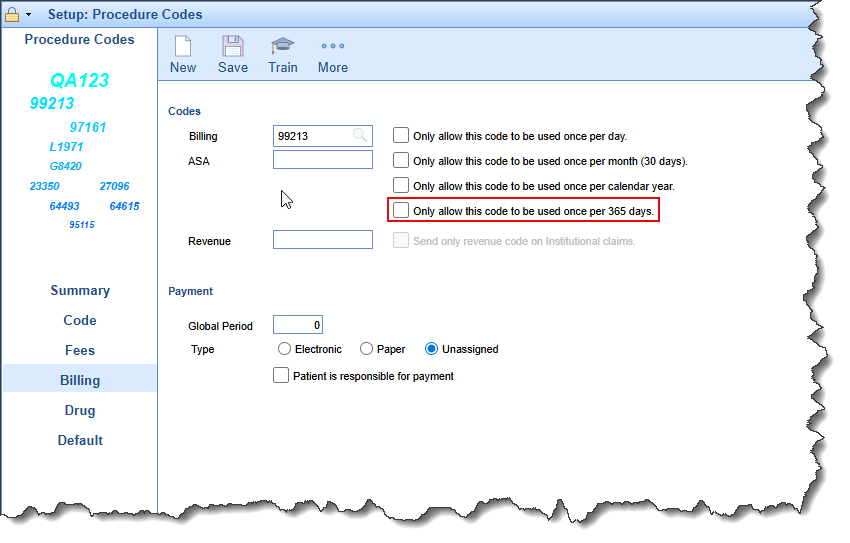
Added Print and Export to Excel Option to Biller Productivity Report
U19607: Previously, the Biller Productivity report located under the Reports portal, lacked print or export options, preventing users from obtaining a hard copy without claim details. In this release, we added "Print Summary" and "Export Summary to Excel" buttons to the upper right corner of the Biller Productivity report. We also resolved several bugs, including incorrect rendering when a "group by" value was null or undefined, which caused column data to shift left. Additionally, we corrected the formatting of "Date of Service" when selected as a "group by" option.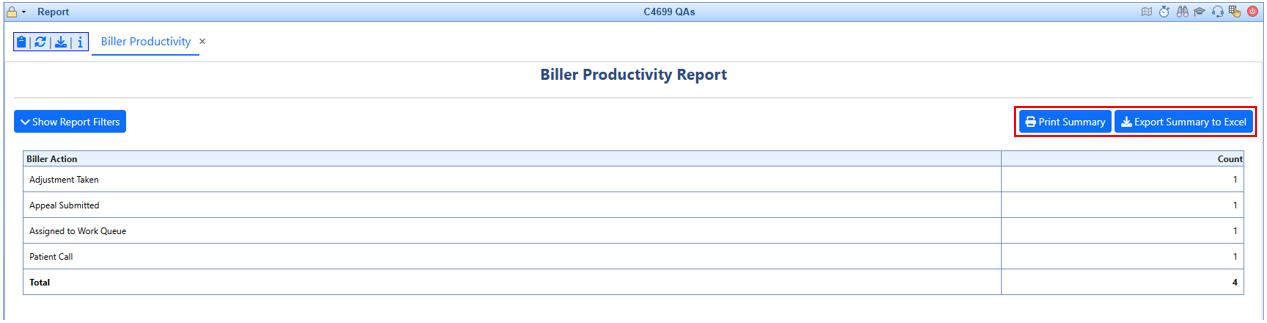
Enhancements
New iScheduler Multiselect Option for Recall Search Status and Resource
U15889: In this release, we updated the Status and Resource drop-down fields to now be multi-select options within the iScheduler's Recall Search screen. 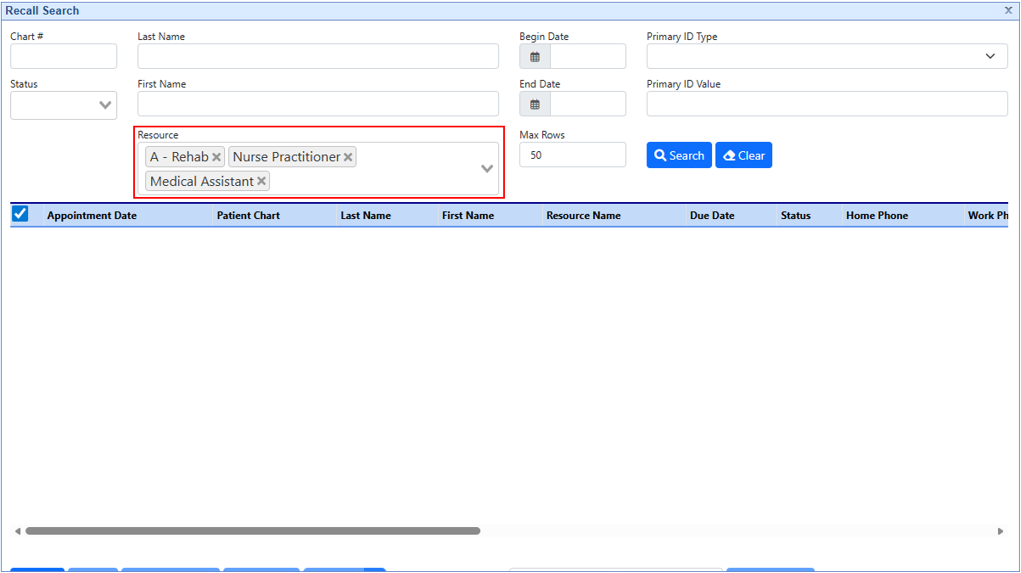
Ability to Store/Audit Provider's Former Name
U16688: A method for documenting former provider names has been implemented. This is essential for practices to store previous names and the date of name changes when providers marry, divorce, or otherwise alter their names. The audit screen has been updated in this release to display former names as values in the new audit log. 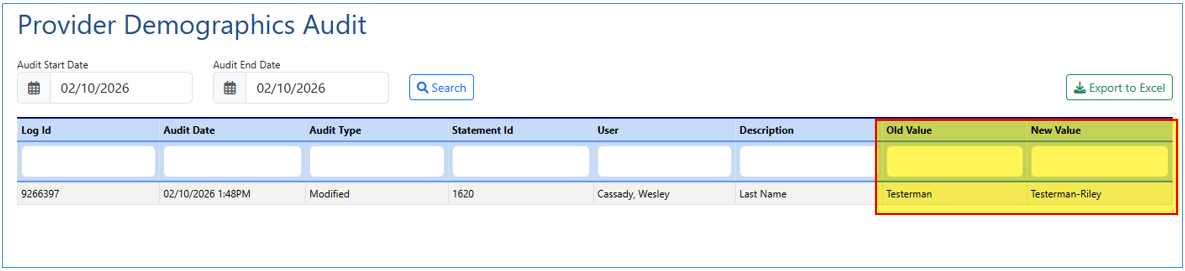
Practice Summary report - Convert to Using New Export Data Request Batch
U18652: New functionality has been added to the Practice Summary Report. If the number of detailed records exceeds the "Maximum claims processed in Practice Summary (Detailed Report)" company setting, the long-running report request will be sent to an export data request queue. This ensures that when a search yields results exceeding the configured company setting, an export data request is generated rather than displaying an error. 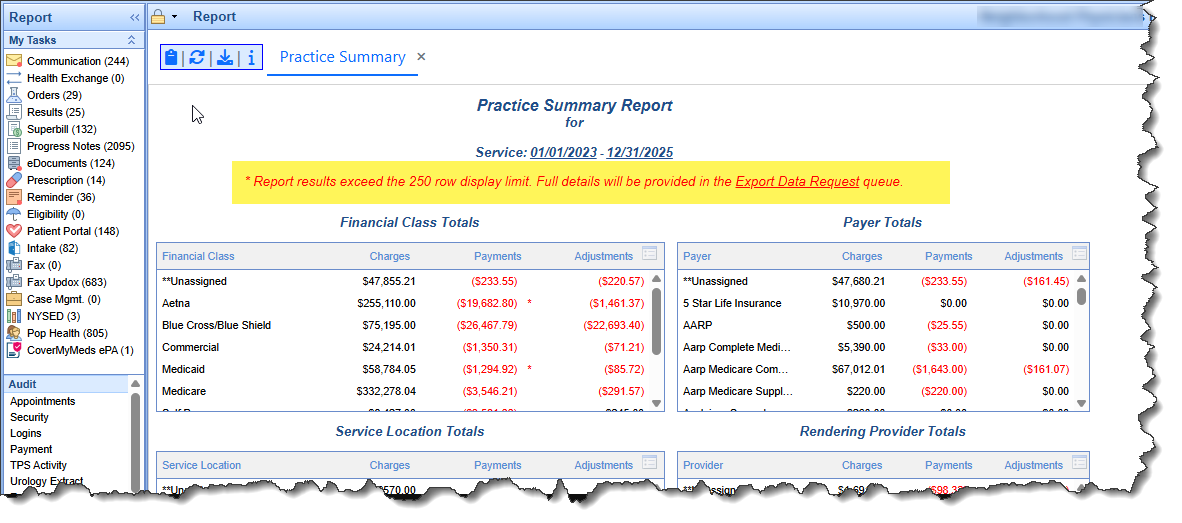
Added Primary Payer, Payer Financial Class & DX Codes to Referral Source Connect Report
U20195: New result fields were added to the Referral Source Connect Report. The new fields are: Claim's Primary Payer, Primary Payer Financial Class, and Claim Diagnoses 1-12. 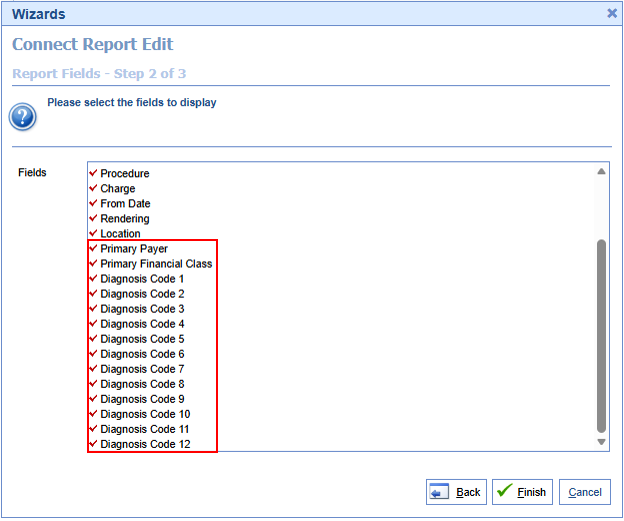
Added POS to the Claim Procedure Detail Connect Report
U20225: POS has been added to the Claim Procedure Detail Connect Report. This report is primarily used to export charge details, and POS is a key component for billing. In this release, two fields were added to the report: POS and POS Description. Both the POS and POS Description fields are now available for the Claim_Procedure_Detail Connect Report. 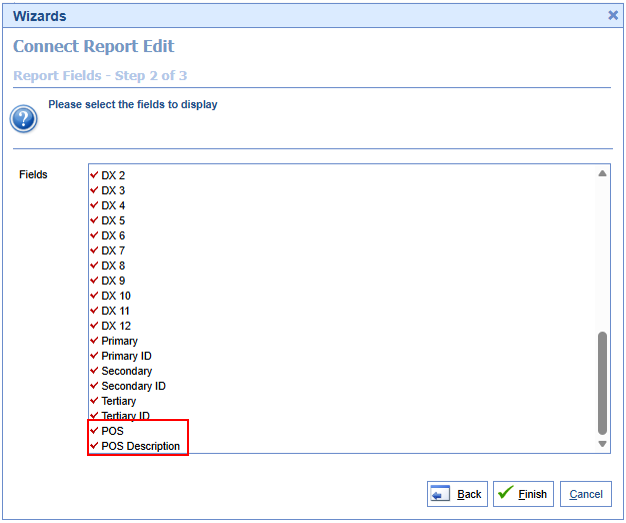
Quick Pay Add Address to the Patient Name Hover Option
U13936: The patient's address has been added to all Patient Header components (patient hover-over sections). This includes the EMR, iScheduler, Quick Pay, and eDocuments portals. When using the hover-over option in these sections, the address will now be visible below the patient's phone numbers. 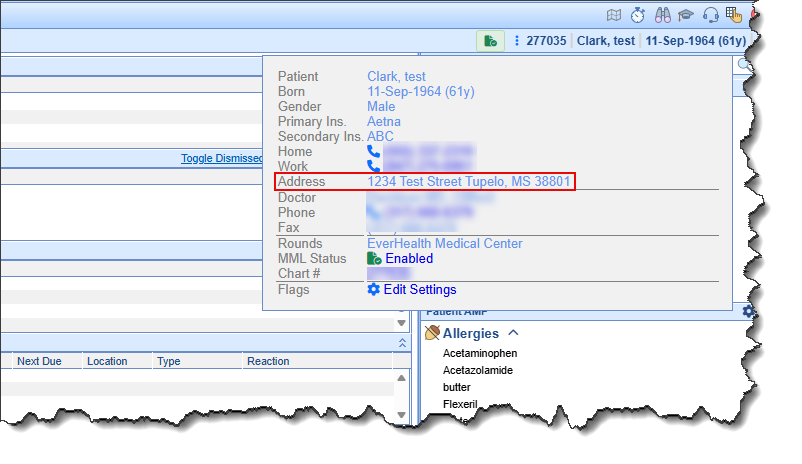
Added "Created Date" to Payment Plan Search Criteria
U20720: We added a new "Created Date" search display field to the Payment Plan Display Settings. When set, this new setting option will add a "Created Date" field with a date range under the Payment Plan Dates section of the payment plan's Advanced Search, allowing it to be used in advanced searches. It will also add a new column for the created date in the results table. 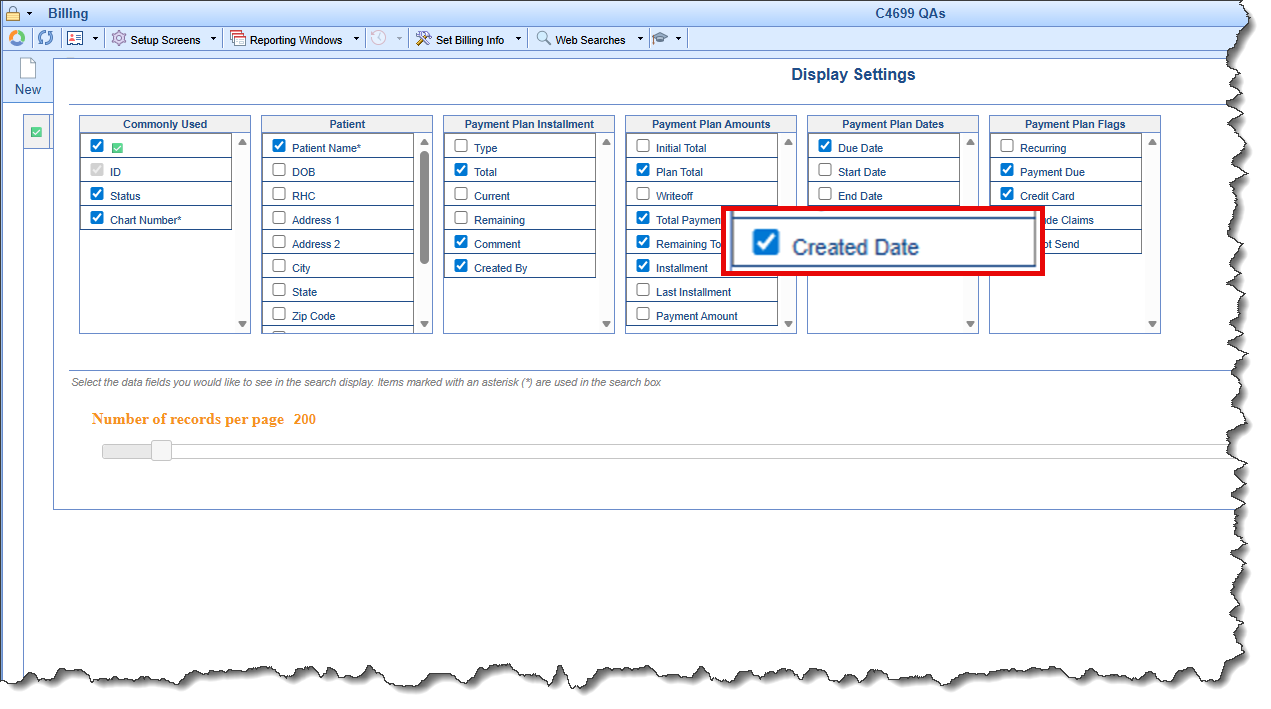
New Payment Plan Creation Update Save Button Functionality to be Save and Close
U20721: When creating a new Payment Plan, the "Save" button functioned as "Save and New." In this release, we updated the function of this button to "Save and Close." This change was made because users typically create a single payment plan per patient, and the previous functionality of saving and then presenting a blank entry was not typical workflow. If users were not careful, they could inadvertently create multiple payment plans. The "Save" button on the Payment Plan Setup window will now save the new payment plan and close the setup window.
Added Total to the Bottom of the Refund Register Report
U20614: Dollar amount totals have been added to the bottom of the Refund Register report window, accessible via Billing > Credit Balance > More. This advanced search window now conveniently displays totals in the lower-left corner. 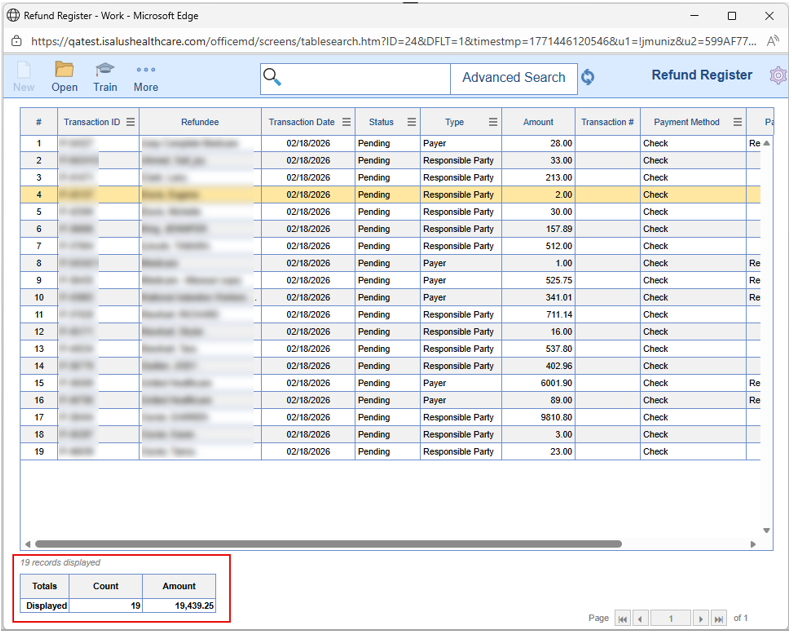
Payer Mix Report Enhancement
U13689: Enhancements have been made to the Payer Mix Report Options. New "Group By" options include Rendering, Referring, and Alternate Providers, as well as Paid by Financial Class, Paid by Payer, Code Class, and Patient Location. Additionally, new filter options have been added for Rendering Provider, Paid by Financial Class, and Paid by Payer. These new grouping and filter options are now available in the Payer Mix Report. 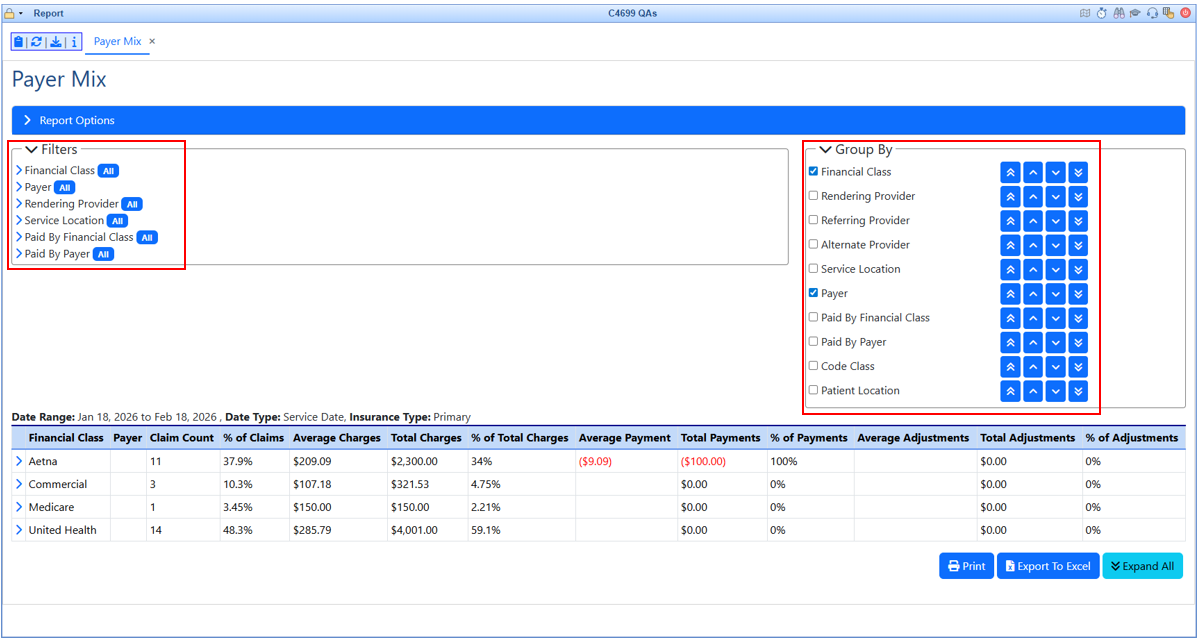
Option to Bulk Print Cost Estimate From Estimate Approval Window
U20935: If a patient does not have an MML account to view an approved estimate, some customers workflow is to print the estimate and have it mailed to the patient. To facilitate this, a bulk print option for cost estimates has been added to the Estimate Approval window. This allows users to select and print up to 50 estimates in a single print job. 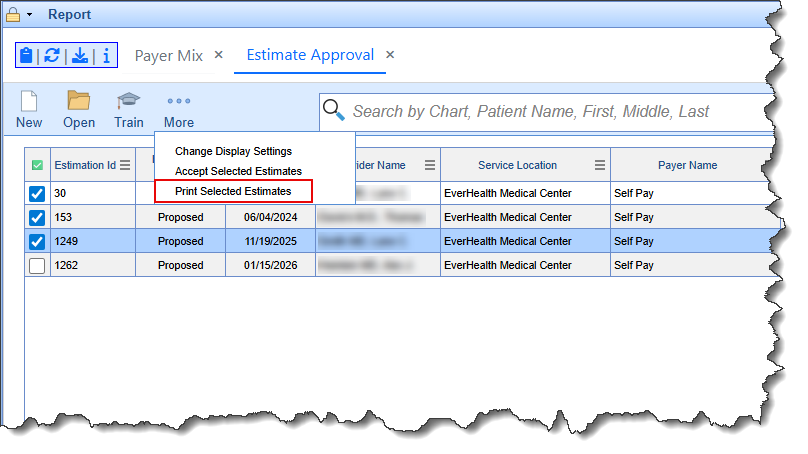
Appointment Types: Add 5 Additional Cost Estimator Procedures
U19888: Additional Cost Estimator Procedures were added to the Appointment Type Setup. Previously, the appointment type setup only allowed mapping up to five procedures, even though some appointments include more than five procedures in a single visit. To address this, five additional procedure fields (6-10) were added to the Cost Estimator Procedures in the Appointment Type Setup. These new fields mirror the functionality of Procedures 1-5 and can be mapped to an appointment type for use in the cost estimator. 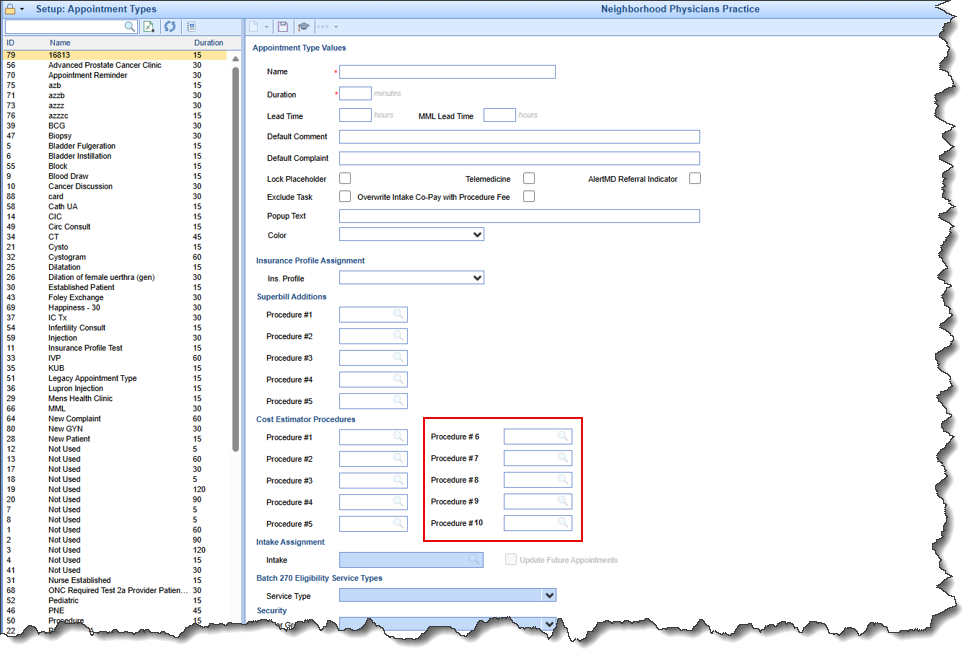
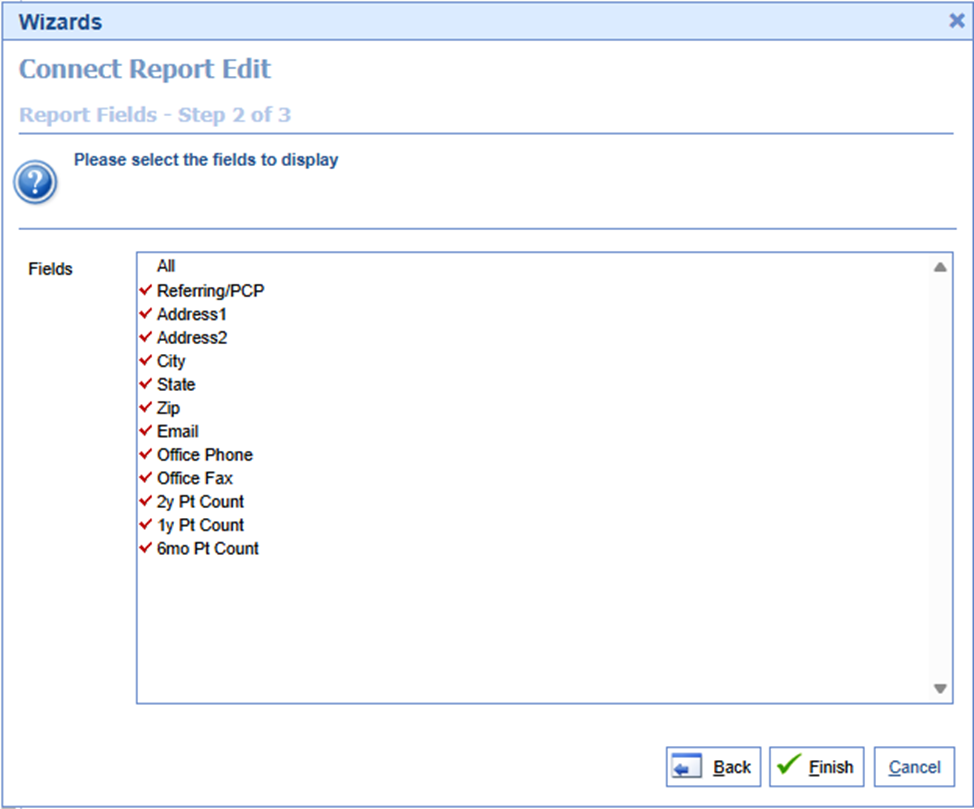
Added Referring Provider Contact Information to the Referring History Connect Report
U20053:We added the following referring provider contact information fields to the Referring_History Connect report:
- Address 1
- Address 2
- City
- State
- Zip Code
- Phone
- Fax
Updated Claim Progress Note List to Mirror EMR Summary Progress Note List
U20247: Previously, the claim progress note list view did not follow the same naming format as the EMR summary progress note list view. The EMR summary progress note list view utilizes the template name instead of "Progress Note" to identify the specific note. In this release, we updated the Claim Progress Note List view to display the template name, as is done in the EMR, in place of "Progress Note". The sign-off user(s) will remain the same, based on the company setting "Soap note sign off user to display".
EMR Portal - Exclude Block Time From Patient Count
U14066: Previously, the iScheduler count at the top of each schedule excluded the "Block, Time" patient. However, the EMR patient count included this block patient as an actual patient. In this release, we removed iScheduler block times from the count so both the EMR schedule count and the iScheduler now provide an accurate patient count.
Added Copay, Balance, Responsible Party, and Insured as Display Fields to Appointment Report
U18813: New fields have been added to the Appointment Report display settings. Display fields for Payer Copay & Insured Name (under primary, secondary, and tertiary payers), and Patient Balance & Responsible Party Name (under patient demographics options) are now available. 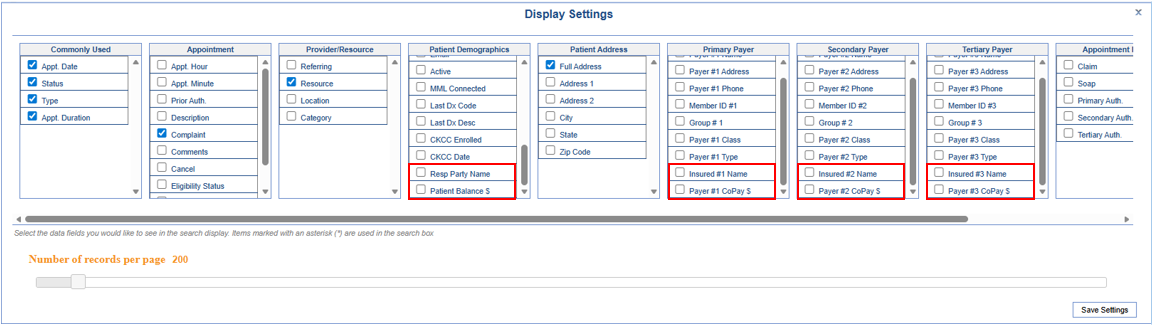
Reporting Cleanup - Disabled 5 Reports
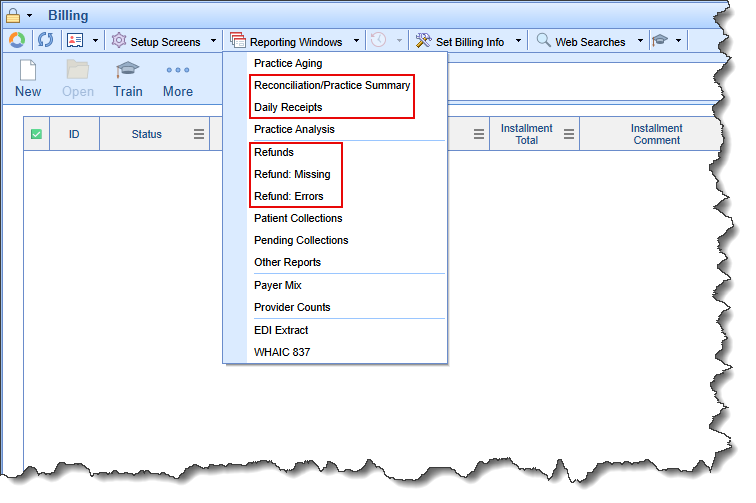
U20513: Five outdated and unused reports were disabled in the Billing portal's Reporting Window. These reports will remain disabled for at least one release cycle (one month) before permanent removal. This buffer period allows for re-enablement if they are deemed critical to user workflows. The reports being sunsetted were located under the Billing portal toolbar (Reporting Windows) and include:
- Refunds -> the Credit Balance window replaces the functionality of this report
- Refund: Missing -> the Credit Balance window replaces the functionality of this report
- Refund: Errors -> the Credit Balance window replaces the functionality of this report
- Daily Receipts - (Also removed from the Reports portal > PM Reports) -> the Receipt Analysis report replaces the functionality of this report.
- Reconciliation/Practice Summary - (Also removed from the Reports portal > Billing) -> the Practice Summary report will remain in place.
Resolutions
Claim Activity Log - Displaying claim levels as # or code instead of description
B11866: Corrected an issue in the claim activity logs where, whenever claim levels were switched in the Deposits module, the Claim Activity Log displayed a number instead of the actual status name. When the level was switched through the claim screen, it displayed correctly. We implemented a change to how we log claim status and level to include current description keys. 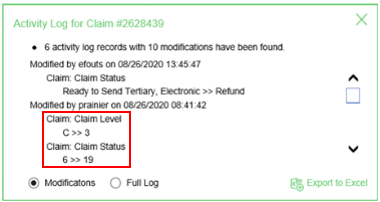
Claim Inspector Desktop Gadget Showing Overlapping Line Graph Data When the User Does Not Have a Provider Set
B20717: Resolved an issue within the Claim Inspector Desktop Gadget where the line graph displayed overlapping data if the "User is this provider" option was not set. When this option is not selected, the Claim Inspector's Practice Productivity should of show the count for the entire practice and when toggled to "My Productivity," it should display 0 with no line graph. We updated the database request to correctly handle missing provider information. 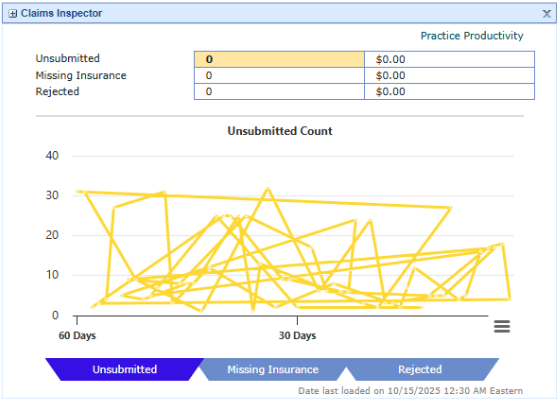
MML Lab Results List Display Column Reviewed Date Not Mapped to Display Date
B20991: Corrected an issue where, when patients logged into their MML accounts and selected "Lab Results" from the side navigation panel, the lab results list displayed a numeric identifier instead of the actual review date in the "Reviewed Date" column. 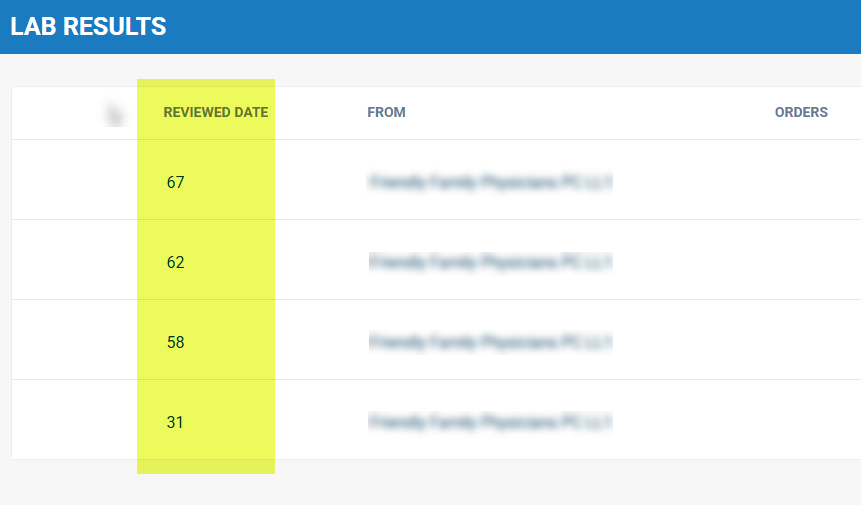
Billing Metrics - Aging Calculation Mismatch
B14137: The Billing Dashboard's Billing Metrics provide aging based on patient and insurance, but this calculation did not match the Aging Analysis report because the billing metrics used an outdated aging calculation. We updated the code so that Claim Aging in Billing Metrics now pulls from the Aging Analysis report and its background table. Code was also added to insert aging balances daily into the "cw_lookup.dbo.client_report_aging" table while also separating out the Aging Metric into its own panel.
Company Setting: "Soap note sign off user to display" Displays All Users when Multiple Notes created the Same Day
B15816: The company setting "Soap note sign off user to display" allows the practice to select which user appears in the claim Progress Note dropdown. However, when multiple progress notes are created on the same day, all users for all notes are listed, regardless of the setting. This makes distinguishing between specific notes difficult. This release addresses the issue by aligning the display with the EMR summary progress notes screen.
Connect Report: Deceased_Pat_RespParty Giving Log Error on Limited Fields Display
B17536:The Connect report, "Deceased_Pat_RespParty," was generating log errors when field selections were limited. In this release, we fixed the "sort by" function, which triggered the error by assuming the user would select at least 13 fields. We also corrected a duplicate "Patient Last" field and updated the "Patient RPM (Death) Date" label to "Patient RHC (Death) Date."
Intelligent Intake: Social Security Number Issue on Mobile Device & Desktop
B18147: Corrected issues associated with completing the newly added Social Security Number section on Intelligent Intakes. We corrected mobile device issues where inputs were not treated as numeric, as well as an input field issue when using the mobile portrait view. We also addressed a desktop version issue that prevented users from using the keyboard's number pad to enter the SSN.
Payer Mix Report Fails to Export
B18162: Corrected an issue that prevented the Payer Mix report from exporting when multiple filters were applied. This issue also caused the database to freeze after the export selection, resulting in failed exports. The code that previously caused an infinite loop when more than two "group by" selections were made has been fixed in this release.
Payment Analysis Code Class Procedure Filter Issue
B19213: Corrected an issue in the Payment Analysis Report where selecting an individual procedure code within the code class filter did not correctly filter by that code. The code responsible for filtering specific procedure codes selected within a code class has been rectified.
Receipt Made For a Payment Plan Not Applying To Claims on Payment Plan
B19674: When a receipt is generated from a payment plan installment, it is not being applied to the claims associated with that payment plan. The objective is to apply the payment plan receipt to the relevant claims during the reconciliation process. The disbursement logic for these receipts should follow the general payment posting logic, which is governed by the company settings established by the practice. However, the disbursement of these receipts should only occur if the claims are part of the payment plan. On the Payment Plan Details, the functionality of the "Included Payment Plan Balance Claims" section was updated to always display, even if no claims are linked to the payment plan. This will make it more obvious when claims are not linked to the payment plan.
Appointment Report Not Updating the No Claim and No Soap Flags
B19921: Resolved an issue in the Appointment report (Report portal > General > Appointment) where the "No Claim" and "No SOAP" flag fields were not updating when documented for an appointment. In this release, the "Claim" and "SOAP Note" columns have been updated to accurately reflect whether a claim or SOAP note is documented for an appointment.
e-Receipt From Credit Card Receipts for Payments Over $1,000 Sent as $1
B20261: Corrected an issue where e-receipts sent to patients via Credit Card Receipts for payments exceeding $1,000 displayed the payment as $1.00 instead of the actual amount. This issue, which did not occur with e-receipts from Quick Pay, stemmed from displaying amounts with commas. We corrected this by formatting them as currency, and then converting them to a string for email/text messages.
MML Family Accounts: Unable to view shared eDocuments for related accounts
B20572: Corrected an issue that prevented patients with an MML family account from viewing records shared by the practice to their MML account (related account). This persistent issue within the Documents tab in MML was associated with a previous bug and has since been resolved.
Auto Associate Accident is Pulling Resolved Accidents
B20777: Corrected an issue where, after an accident was marked as resolved in the patient chart, it was still being associated with claims. The process was updated to now ignore resolved accidents so that they are not pulled after being marked as resolved.
Claim Entry Not Refreshing After Patient Setup Changes are Made
B20786: With the modernization of Patient Setup and its transition to a non-modal window when accessed from the Claim Entry screen, Claim Entry no longer refreshes upon closing Patient Setup, thus failing to reflect recent changes. In this release, we modified the process: if the patient window was opened, its closure will now trigger a user message if the claim has been modified. If the claim has not been modified, it will be refreshed.
Additional Check-In Prompt Also Prompting for Rescheduled Status Appointments
B20918: When an appointment is rescheduled on the same day from one resource to another, the "Additional Check-In" prompt incorrectly includes the rescheduled appointment. This leads to users overlooking the rescheduled status and checking in the appointment again. To resolve this, we have updated the system to exclude appointments with a "Rescheduled" status from the "Additional Check-In" prompt, similar to how "Cancelled" appointments are already excluded.
Payment Plan Deferred Installment Still Processing On File Credit Card
B20983: Investigated a potential issue where a customer's payment plan had a deferred installment, but the payment was still processed using the credit card on file. Code was added to ensure that when an installment is deferred, the transaction for that date is also removed, preventing the credit card on file from being processed.
Cancelled Payment Plan Remaining in MML Allowing Payment
B21000: Resolved an issue where, when a Payment Plan is set to "Cancelled" status, it still appears in MML, allowing payments to be made. When a payment is made, the Payment Plan reverts to an "Active" or "Past Due" status. Furthermore, if the Payment Plan has a card on file and is set for recurring payments, this triggers the processing of subsequent installments. MML should only display Payment Plans with an "Active" or "Past Due" status. In this release, we updated the code to only retrieve active or past due payment plans. Display issues for Installments and Payment History under Payment Plans have also been resolved.
Claim Modification screen does not reflect auditing in other claim status/level modification processes
B21147: Corrected an issue where the Claim Modification screen did not log auditing for "Claim status description" or "Claim status level." Auditing has now been added for these fields when modified in the Claim Modify screen (Patient Transaction History > Modify Screen).
Prescriptions - In Prod we display gabapentin options which are obsolete according to FDB
B21149: Resolved an issue causing RX send errors related to an inactive NDC. Since these medications are not active in the FDB, and thus should not be available for selection in the UI, the system was updated to display only active medications, preventing error messages and prescribing issues.
As part of this release, we are continuing our ongoing work to assess, monitor, and address any security vulnerabilities.
