Highlights
New features
CCDA 2026: What’s Changing for Your Practice
OfficeEMR is preparing for the ONC HTI-1 2026 certification requirements, including support for the updated CCDA 2026 standard. These changes are ONC required and focus on improving data quality and interoperability while minimizing impact on your day-to-day workflow.
Please be aware that the General Availability (GA) date for CCDA 2026 in OfficeEMR is to be determined (TBD), but will be no later than March 31, 2026, as required by ONC HTI-1. We will provide advance notice before changing the default CCDA format.
Most of the work for CCDA 2026 happens behind the scenes so there are no new screens or major workflow changes are required for CCDA 2026 at this time. Most changes are primarily in the data captured and the codes and formats used behind the scenes to meet updated national standards. From the standpoint of working in the EMR the transition should be seamless with no changes to user workflows.
The 2026 CCDA key updates are as follows:
- Persistent Identifiers (Persistent IDs)
Each key clinical item (such as problems, allergies, medications, vitals, immunizations, and results) receives a long-lived identifier. This helps receiving systems recognize whether an item is new or an updated version of information previously sent. - New and Updated Clinical Fields
Fields needed to support USCDI v3 (such as verification status for problems and allergies) are being added to existing legacy screens. These additional fields improve how your data is understood when exchanged with other systems. The majority of these field changes will be visible as part of this release but there are no expected changes from a practice workflow perspective. Learn more about EMR Field Updates. - Enhanced Demographics and Social Data
Demographic and social data elements (such as gender identity, pronouns, sexual orientation, tribal affiliation, occupation, and related value sets) are being updated to meet current national standards. - Improved SDOH and Results Representation
Social Determinants of Health (SDOH) panels and lab/imaging results are being aligned with USCDI v3 and CCDA 2026 expectations for more consistent interoperability. - Updated CCDA Stylesheet
A new human-readable CCDA stylesheet is being introduced for 2026 CCDAs. Practices will have a company setting to continue using the legacy stylesheet if needed.
What Actions do I need to take for the CCDA 2019 to 2026 Transition?
For most practices, no action is required. The exceptions are as follows:
If you only use standard OfficeEMR workflows (MyMedicalLocker, transitions of care, referrals, and FHIR-based patient access), the CCDA 2026 transition will be handled by iSalus automatically. However, if your practice sends CCDA files to systems outside of the standard OfficeEMR workflows, then action will be required to ensure the entities that you share your data with are ready for this new 2026 format.
Do I need to take action?

If you have any of these external processes, your external partners will need to be prepared to receive the CCDA 2026 format instead of 2019 CCDA. We have provided some additional notes and an email template in the Knowledge Article linked below.
2026 Reminder for MIPS Provide Patient Access Measure
This is not a change but a reminder for practice to meet the MIPS Provide Electronic Patient Access PI Measure, ONC (CMS) requires a practice to ensure they have:
- Enabled the FHIR API for MIPS Reporting
- To pass the measure each patient visit in the reporting period must show that the patient is Connected to MML or Opted Out of MML
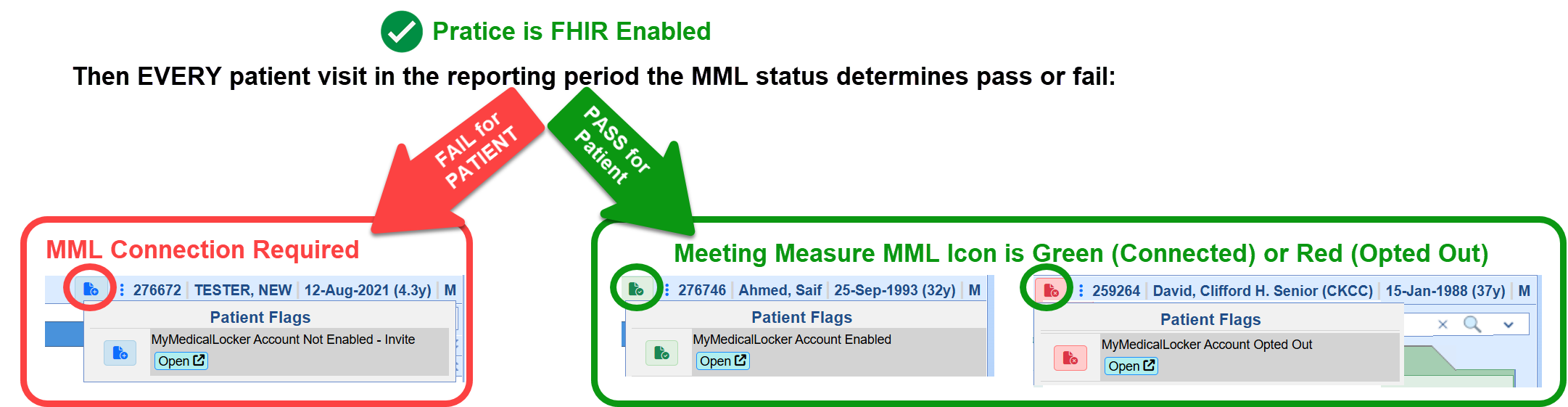
Click Here to learn more about improving your score for this MIPS Promoting Interoperability Measure
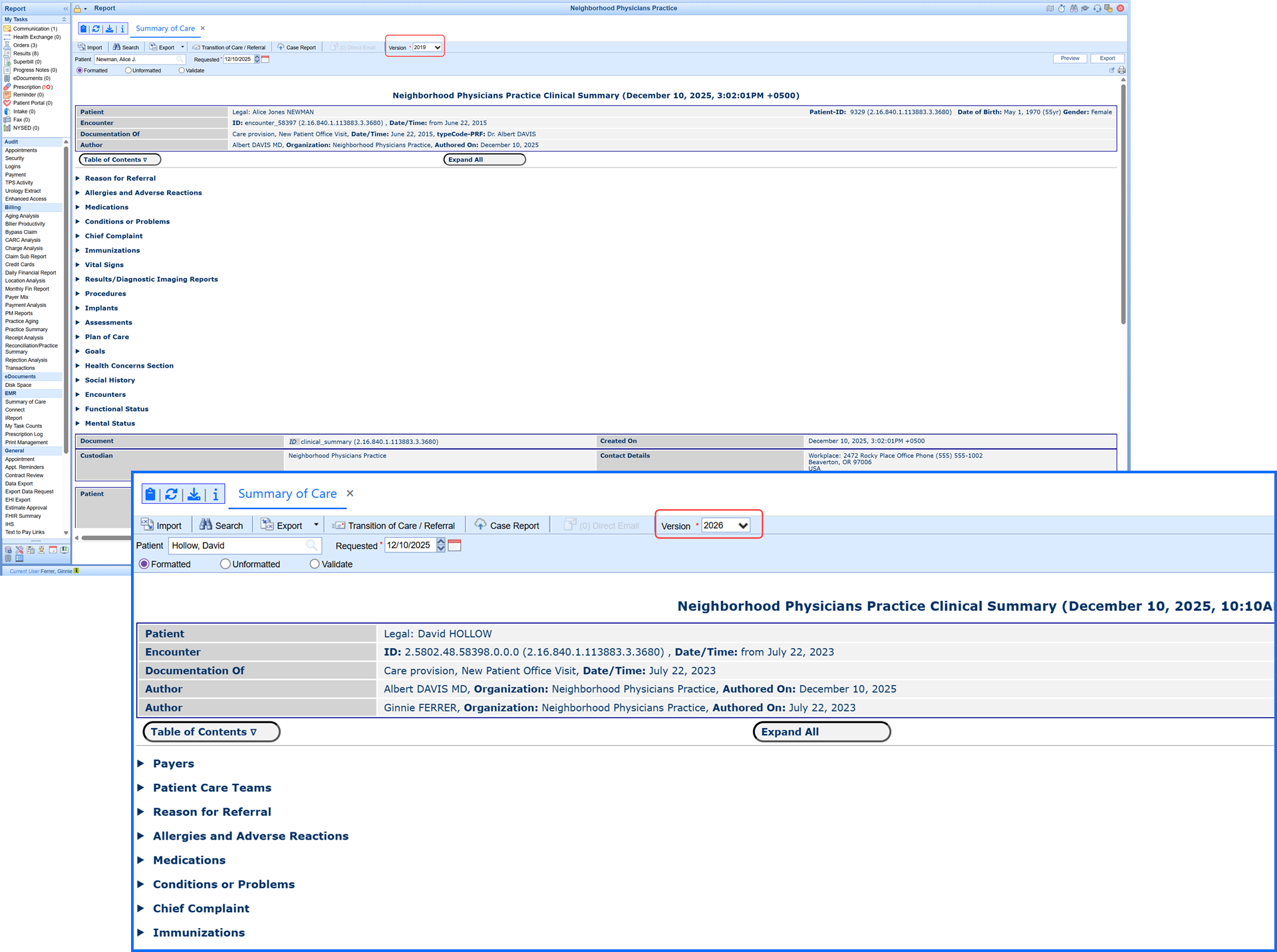
New Modernized CCDA Style Sheet
A new simplified and modern CCDA viewer has been added to align with USCDI v3 standards and deliver improved readability and full support for all CCDA versions.
What to expect
- Modernized, cleaner CCDA viewer supporting all CCDA versions (including MML viewing)
- Backward compatibility for the current (2019) and prior CCDA versions
- Streamlined layout improves readability and meets HTI-1 / USCDI v3 needs
- Provides for a seamless transition when 2026 CCDA goes live
Enhancements
USCDI v3 Case Reporting (elCR) Update to Version 3.1
U20019: As part of our HTI-1 2026 certification updates, OfficeEMR has upgraded our electronic Initial Case Report (eICR) to Version 3.1.1. This version is the nationally required standard for public health reporting under the 2026 CCDA rules and ensures full compatibility with the Association of Public Health Laboratories (APHL) AIMS platform and jurisdictional reporting systems.
What’s Included in the 3.1.1 Update
The updates included in this release focus on aligning our eICR output with the latest CDC/HL7 requirements. These changes occur automatically in the background and do not require any workflow changes from your practice.
- Updated eICR structure to match Version 3.1.1 format required for 2026 reporting.
- Birth Sex normalization (standardizing values to M / F / UNK) to meet new public health rules.
- Improved validation handling, including structural cleanup and standardized NullFlavor usage.
- Updated value sets for manufactured materials, procedure codes, and other clinical elements validated by public health agencies.
- Expanded data capture to support new USCDI v3 fields that flow into both the CCDA and eICR when available.
These updates ensure that your organization’s electronic case reports continue to be accepted by public health agencies and meet all national certification requirements. The eICR 3.1.1 upgrade is included as part of the HTI-1 2026 CCDA release.
2026 CCDA/FHIR Document Updates
U20121: We added the following updates that align with USCDI v3 and ONC’s HTI-1 rules in order to advance data standardization and interoperability.
New & Updated EMR Fields Required for HTI-1
Existing field values have been automatically mapped into the updated USCDI v3 standard lists, so no data has been lost. The updated pick lists you see now reflect the required HTI-1 values. While HTI-1 requires that these fields be available within the EMR, practices are not required to collect or populate every demographic field for every patient. The new/updated fields are:
Patient Setup/Demographics: Includes additional fields and updated pick lists to support required HTI-1 / USCDI v3 data elements. Some fields existed previously but are now required to be available.
| Field | Status | HTI-1 Purpose |
|---|---|---|
| Sex Assigned at Birth | Updated | Supports USCDI v3 demographic element for this field |
| Gender Identity | Updated | Supports USCDI v3 demographic element for this field |
| Sexual Orientation | Updated | Supports USCDI v3 demographic element for this field |
| Race (Granular) | Updated | Supports USCDI v3 demographic element for this field |
| Ethnicity (Granular) | Updated | Supports USCDI v3 demographic element for this field |
| Preferred Language | Updated | Supports USCDI v3 demographic element for this field |
| Tribal Affiliation | Updated | Supports USCDI v3 demographic element for this field |
| Occupation | New Required Field | Supports USCDI v3 demographic element for this field |
| Industry | New Required Field | Supports USCDI v3 demographic element for this field |
Problem List: This screen did not receive many new visible fields, but several existing fields are now more critical for HTI-1 / USCDI v3 compliance:
- Problem Status (e.g., Active, Inactive, Resolved) – existing field used to generate required status codes.
- Onset Date – existing field that, when present, is included in outgoing CCDAs.
- Resolved Date – existing field used when a problem is marked resolved.
- Problem Type / Category – mapped behind the scenes for USCDI problem/health concern classification.
Allergies: This screen retains its existing layout. For HTI-1 / USCDI v3, the following fields are especially important:
- Allergen (coded when possible) – used as the primary coded concept in CCDAs/FHIR.
- Reaction – existing text or coded value, included in structured exports when available.
- Severity – existing severity values used where supported by the standards.
- Status (e.g., Active, Inactive) – required for correct allergy representation.
A new verification field named Verify was also added to the Add Problem and Allergies screens defined by USCDIv3 with options for Unconfirmed, Confirmed, Refuted, and Entered in Error.
USCDI v3 Social Determinants of Health (SDOH) Assessment Panel Templates
OfficeEMR supports four USCDI v3–aligned health assessment panels. These are delivered as templated assessments that we can configure for your practice on request (at no additional charge). Each template is tied to the appropriate LOINC panel and answer codes, includes scoring, and feeds results into Decision Support Interventions on the patient chart. The supported panels are:
- Social Determinants of Health Panel (LOINC 96951-9)
Hunger Vital Sign Panel (LOINC 88121-9)
Pregnancy Status Assessment (LOINC 82810-3)
Disability Status Assessment (LOINC 89571-4)
Each SDOH panel is built as an EMR Template that we configure for you, and every template contains hard-coded associations to the required LOINC questions. There is no client setup or maintenance required. This means that you can use the Patient History templates in the same way you use other patient history templates.
Once a panel is completed, the system automatically publishes the result to the existing Decision Support Intervention (DSI) section of the patient chart. 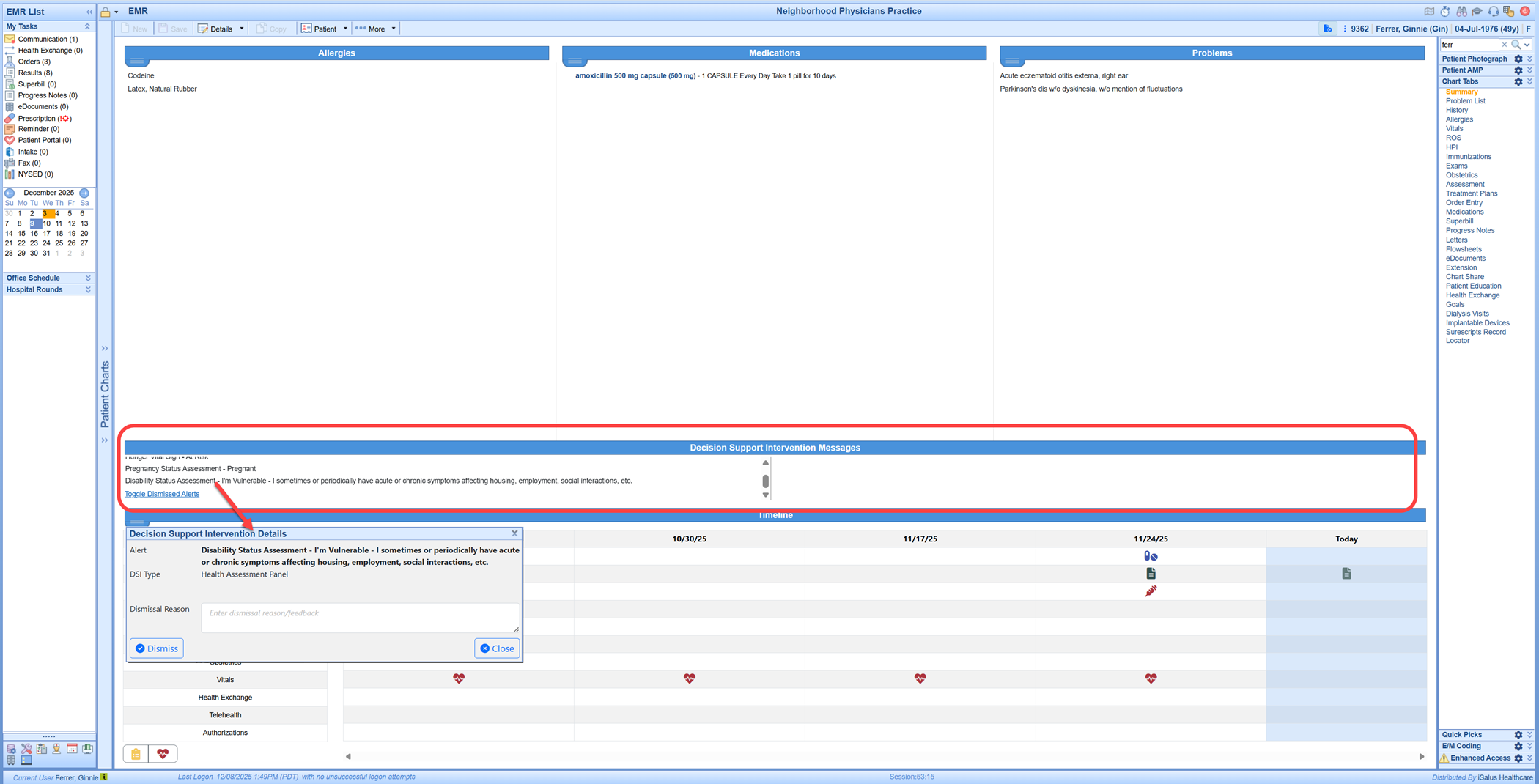
EHI Export Updates for HTI-1 (2026)
As part of HTI-1 / USCDI v3 compliance, the OfficeEMR EHI Export now includes additional data elements required for 2026 certification. These items are included automatically when present in the patient chart. These new elements are incorporated into the structured patient records and documents included in your standard EHI Export package.
- Demographics: Tribal Affiliation
- Demographics: Occupation
- Demographics: Industry
- Allergies: Verification
- Problems: Verification
2026 CCDA Persistent IDs & Compliance
U20308: OfficeEMR now includes Persistent IDs in the new CCDA 2026 format as part of the ONC HTI-1 requirements. These are background identifiers that help other systems recognize when a clinical data item (like a problem, allergy, or medication) is the same item over time, even if it’s been updated. This does not change how you chart, sign notes, send referrals, or generate CCDAs. Everything is handled automatically by the system.
Please note that if you currently send 2019 CCDA files to registries, payers, HIEs, or other external systems, you must take steps to ensure those partners can receive the updated CCDA 2026 format.
- Problem (e.g., Hypertension)
- Allergy, Medication, Vital, etc.
Example: 2.5802.11.71.0.0.1
- Identifies the specific item
- Last number = version
- Sees the same ID again later
- Knows if the item changed (version ↑)
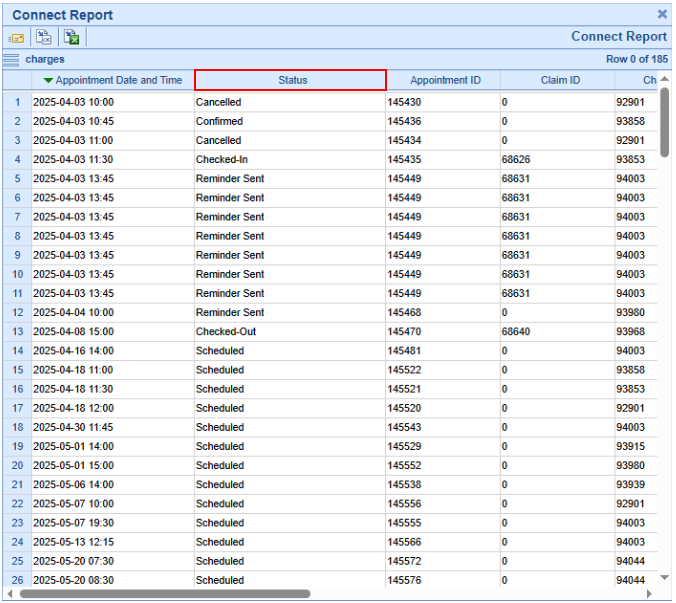
Modified Connect Report Charges by Appointment Type to Include Appointments With No Claim
U20745: We updated the "Charges by Appointment Type" Connect Report to include appointments regardless of whether a claim is attached. This enhancement helps users identify procedures for which claims have not been documented. All appointments within the specified date range and appointment type search parameters are now displayed, even without an associated claim. Additionally, "Appointment Status" has been added as a display field to indicate canceled appointments
Update Connect Report Claim PT Demo Export to Populate the Procedure Billing Code as Opposed to the Claim Code
U20829: We made an update to the Result Processing so that the "Save & Next" option will follow the order of items in the task results list (displayed on the left side) and bypass any "additional pages" until they appear within the "Results to Review" list. This addresses previous confusion caused by the system not progressing sequentially through the "results to review" when multiple pages were associated with a single result. In this release, we removed the code that caused it to moved users to the next page. Users can still manually navigate between pages using the page count controls when desired. This enhancement ensures a smoother, more consistent review process by preventing skipped results and reducing the need to scroll or refresh thus improving efficiency.
Resolutions
MML Displaying Patient Paid Under Most Recent Payment Although the Credit Card Transaction Declined
B20856: Corrected an issue where, a patient's MML account displayed a declined credit card transaction under the "Most Recent Payment" including an amount and date. In this release, we updated the code to verify the last successful payment and it's status instead of just looking at completed transactions, in order to prevent failed transactions from appearing under the MML's "Most Recent Payment."
Claim Modify Not Allowing Blank Selection to Be Saved
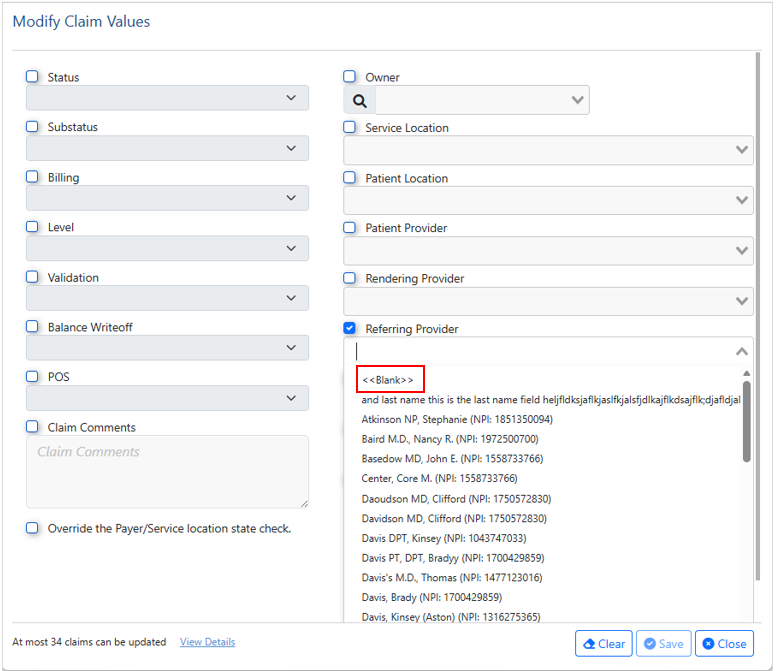
B20934: With the modernization of the Claim Modify window, we previously removed the ability to save a blank entry (<<Blank>>)in certain fields. In this release, we modified the code to add a blank option to the top of the dropdown menus for the following fields within the Claim Modify screen allowing the option to be saved:
- Substatus
- Patient Location
- Patient Provider
- Referring Provider
- Alternate Provider
- Ordering Provider
- Supervising Provider
Claim Modify Not Loading From The Patient Transaction History
B20943: Corrected an issue stemming from the modernization of the Claim Modify window, which previously failed to load or produced an error when accessed from the Patient Transaction History (right-click option). The window was modified to allow the new version of the Claim Modify window to open successfully.
Patient Demographics SSN Input Validation and Auto-Formatting Update
B20757: Resolved an issue where users encountered a "Not valid SS#" error when entering spaces or alpha characters into the ID Type drop-down field set to "SSN" on the modernized Demographics screen. We corrected this allowing the system to automatically format valid 9-digit SSNs with dashes (XXX-XX-XXXX), mirroring the legacy screen's functionality, and rejects entries containing spaces or alpha characters when the ID Type is SSN.
Denial Analytics Not Pulling the Remark Codes On All Claims
B20858: Corrected an issue in Denial Analytics where remark codes (RARC) were only pulled for claims with multiple remarks, ignoring those with a single remark code. This update ensures the system now pulls all remark codes regardless of their quantity on a claim.
Patients Unable to Access Intelligent Intake Via Intake Link
B20915: Introduced improved logging for Intelligent Intake to capture more detailed reasoning for instances where a patient may receive the error message below. This change will help us better resolve reported issues related to patients accessing the Intake via the Intake Link.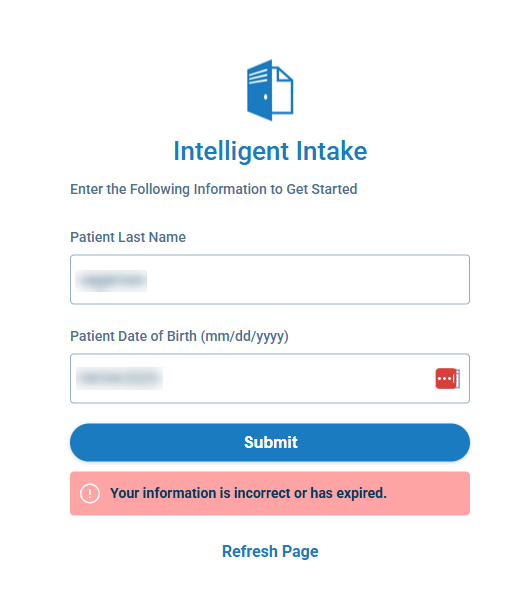
FHIR/CCDA Normalize Medication "doseQuantity" to Valid PQ Datatype:
B20994: We resolved an issue that caused some medication records to fail FHIR/CCDA validation due to improperly formatted dose quantities. The system now automatically normalizes medication doseQuantity values to meet required standards, ensuring that valid numeric quantities are formatted correctly and any non-numeric values are handled safely. This update prevents related errors in CCDA versions 2019 and 2026, and improves the reliability of FHIR and CCDA medication data going forward.
Gabapentin 100mg Prescribing Error Message
B20435: We corrected an issue that would produce an error message when prescribing Gabapentin 100mg capsules. The error message “Controlled Substance must have a DEASchedule populated in Medication prescribed” was due to a sorting issue that was causing an expired NDC# to be associated with a prescription. 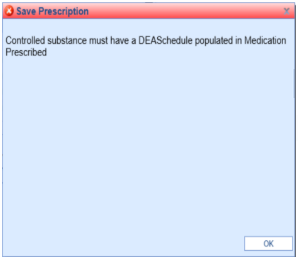
Patient Header Tool-tip: Care Team "Type" Display Issue
B20979: The "Type" field within the Care Team (patient header) Tool-tip display was failing to display the expected data even though the label existed. We updated the tool-tip display so that the Care Team "Type" data is now displayed. 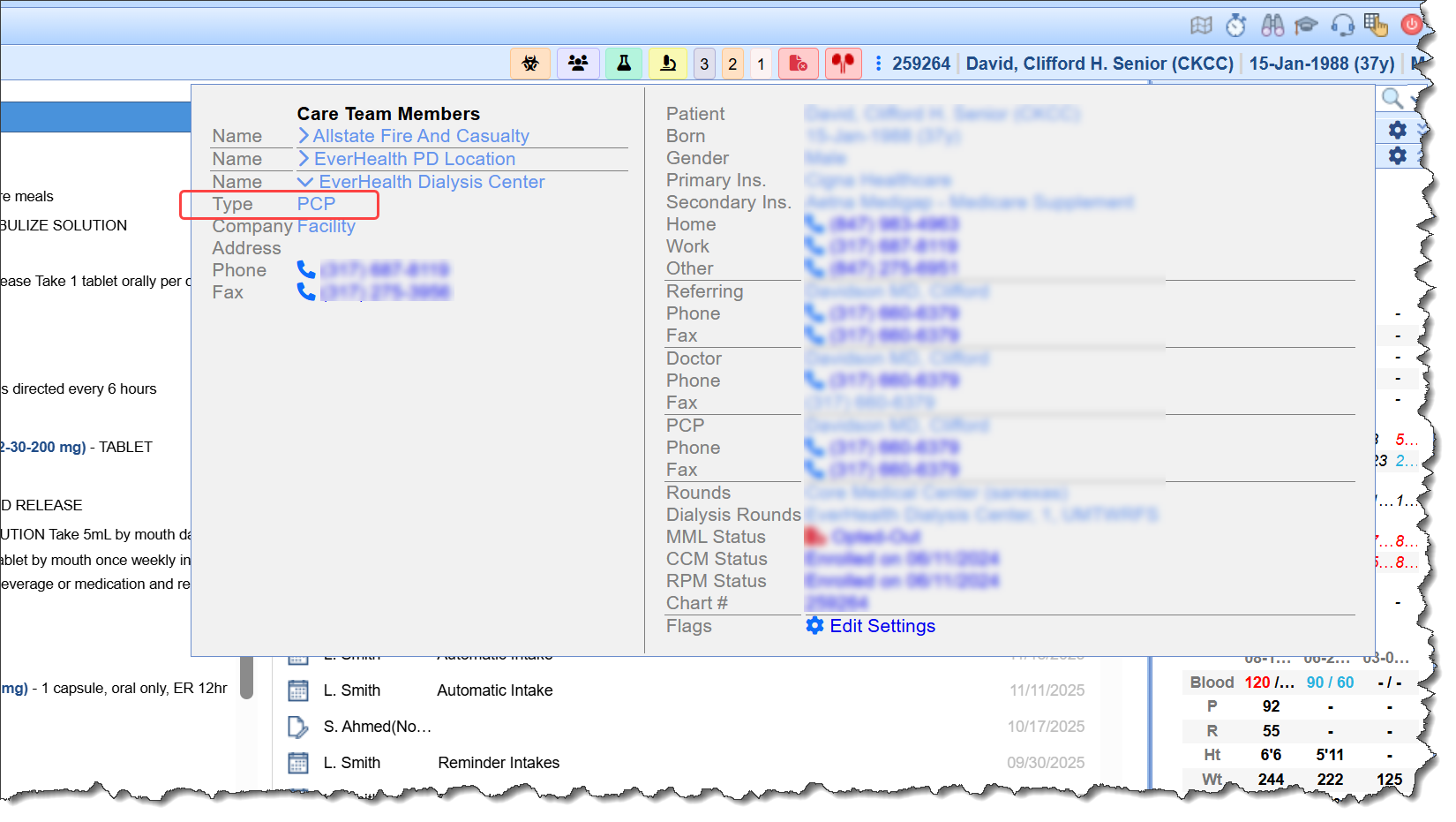
CCDA (xml) Messages Producing Error and Prevent Users From Viewing/Importing
B20976: Corrected an issue stemming from release 25.146 where inbound CCDA files in .xml format failed to load and generated a 500 error. These messages, when accessed via My Tasks > Communication, would not open, and users received an "Unable to Preview the CCD" message. This was caused by the HTML containing a less-than symbol (e.g., value <100). The API was updated from a webservice call to a choice call, which resolved the issue. 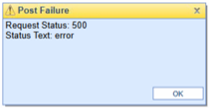
As part of this release, we are continuing our ongoing work to assess, monitor, and address any security vulnerabilities.
